

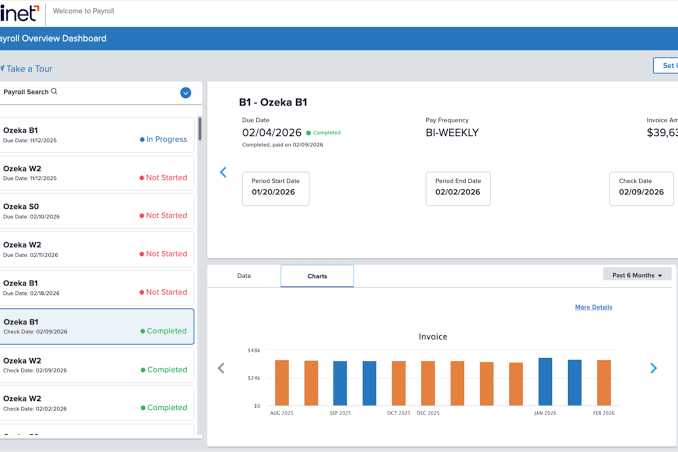
Choosing payroll software is not simply a matter of deciding who is best. The better question is which system best fits how your business pays people, tracks hours, handles taxes, and plans to grow. A platform that works well for a five-person consulting firm may create unnecessary work for a restaurant with rotating hourly shifts. A practical scorecard makes the decision easier. Instead of being swayed by a low introductory price or a long list of features, compare each option against the needs that affect payroll every pay period: accuracy, usability, tax support, employee access, integrations, security, support, and total cost.
Why A Payroll Scorecard Helps
Payroll providers package similar services under different names, plans, and add-ons. One plan may include tax filing but charge extra for time tracking, while another may bundle time tools but limit customer support. A scorecard assigns each category a clear weight based on your priorities so that you can compare options consistently. Start with the realities of your business: employee and contractor counts, pay schedules, work locations, overtime rules, benefits deductions, and expected hiring. Then rate every platform on the categories that matter most. Accuracy and compliance may deserve the greatest weight, followed by ease of use, support, employee tools, integrations, security, and scalability.
The Core Features To Compare
Most small businesses should review the basics before scheduling a demo or beginning a trial. Essential functions commonly include automated gross-to-net calculations, direct deposit, payroll tax calculations, year-end W-2 and 1099 preparation, employee self-service, reporting, and mobile access.
- Time tracking, attendance, overtime, and paid time off connections
- Benefits, garnishments, reimbursements, and other deductions
- Support for salaried employees, hourly employees, and contractors
- Payroll reports that help owners review labor costs and payment history
- Approval workflows before a payroll run is submitted
A feature matters only when it solves a real operating problem. A design studio may value straightforward payroll runs and clean accounting exports. A restaurant may place greater value on time clocks, tip reporting, schedule data, and controls for last-minute shift changes.
Rather than starting with a general ranking, assess payroll tools through the lens of your business profile.
- One-location businesses: Prioritize simple setup, dependable tax filing, and responsive support.
- Multi-state employers: Confirm support for every state and locality where people work, including registration and filing needs.
- Businesses with hourly workers: Review time clocks, overtime calculations, edits, approvals, and payroll cutoffs.
- Businesses with contractors: Check payment records, 1099 workflows, and the ability to keep contractor and employee data separate.
- Fast-growing teams: Look for onboarding, benefits administration, user permissions, and reporting that can expand with the team.
- Remote teams: Make sure employee self-service and location-related tax support are practical for distributed workers.
Check The Full Cost
The advertised monthly starting price rarely tells the whole story. Ask for a complete estimate that covers the base subscription, per-person fees, tax filing, direct deposit timing, year-end forms, time tracking, benefits administration, implementation, migration, and premium support. Build a 12-month estimate instead of comparing opening prices. Include expected hires, seasonal staffing, contractors, anticipated add-ons, and annual filing needs. A system with a higher monthly fee may still be the better value if it reduces manual work or replaces several disconnected tools.
Review Tax And Compliance Support
Tax and compliance support should be among the most important categories on the scorecard. Automation can reduce repetitive work, but the employer still needs to review employee details, payroll dates, filings, account notices, and records. Software does not remove the need for oversight. Use the federal payroll tax guidance available through the IRS to monitor requirements that affect employment taxes, worker classification, filing, deposits, and corrections.
Questions To Ask About Compliance
- Does the platform calculate and file applicable taxes?
- Does it support each state and local jurisdiction where employees work?
- Who handles a tax notice, and what records are available to support a response?
- Are compliance updates included, or sold as an additional service?
- Can payroll reports and year-to-date records be exported when needed?
Look At The Employee Experience
Employee-facing tools can reduce routine payroll questions. Useful self-service options include digital pay stubs, direct deposit updates, withholding changes, timecard review, paid time off balances, benefits access, and mobile account access. Language options can also matter for a diverse workforce. For example, an employee who can securely download a pay statement or submit a bank account update without waiting for an office manager saves time for both parties. However, changes to banks and other sensitive requests should be protected by approval controls and confirmation procedures.
Test Integrations And Data Flow
Payroll should connect reliably with the systems your business already uses, especially accounting, timekeeping, scheduling, benefits, expense management, banking, and human resources tools. Ask whether each connection is automatic, one-way, or two-way. Also ask how often data syncs, what happens when a sync fails, and whether changes can be reviewed before payroll is finalized. Clean data flow helps owners avoid duplicate entry and gives them a clearer view of payroll costs alongside staffing and cash planning. An integration is only valuable when it moves the right information accurately and leaves a usable audit trail.
Ask Better Security Questions
Payroll platforms store sensitive personal, tax, and bank information. Review multi-factor authentication, role-based permissions, encryption, login history, change logs, fraud controls, backup practices, and data retention policies. The privacy risk management guidance published by NIST is also a useful reminder that access to sensitive information should be limited to a legitimate business need. Not every manager needs the same payroll access. A supervisor may need to approve hours without seeing tax forms or bank details. Confirm who can add users, change payment information, approve payroll, and export reports before moving data into a new system.
Use A Simple Selection Process
- List employees, contractors, locations, pay schedules, and payment types.
- Identify current problems, such as manual tax work, timecard errors, slow reporting, or employee questions.
- Separate must-have features from features that are merely convenient.
- Shortlist three to five options that fit the business profile.
- Request complete pricing and test realistic payroll scenarios before signing.
- Confirm support procedures, data export options, and the process for switching providers later.
Common Questions
What Is The Most Important Payroll Software Feature?
Accurate payroll processing and dependable tax support usually come first. The remaining features should reduce manual work and align with how the business manages its workforce.
Is Cheap Payroll Software Always The Best Choice?
No. A low starting price can rise after tax filing, time tracking, benefits, support, and year-end services are added. Compare total cost and operational fit instead.
How Often Should Payroll Software Be Reviewed?
Review it at least annually and after major changes, such as opening a new location, adding remote workers, expanding benefits, hiring quickly, or encountering repeated payroll issues.
Final Takeaway
The right payroll software fits the way a business pays people today while leaving room for sensible growth. A scorecard can bring accuracy, compliance, customer support, employee experience, integrations, data security, reporting, and total cost into one structured decision. Businesses should also consider how easy the system is to set up, maintain, and use for routine payroll tasks, as well as whether employees can conveniently access pay information and tax documents. A platform that works well for a small team may not provide the same value as the workforce expands or payroll requirements become more complex. Reviewing contract terms, implementation costs, available support, and opportunities to integrate with accounting, time-tracking, or benefits systems can also help avoid unexpected work later. The strongest choice is not necessarily the platform with the longest feature list. It is the one that reduces avoidable work, supports accurate and consistent payroll processing, protects employee information, and remains practical for the business over time.