

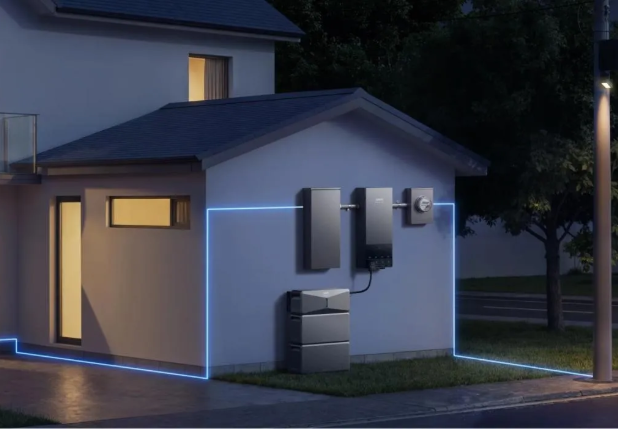
When electricity stops, two questions shape the next few hours: what is happening outside your home, and what needs power inside it? The Oncor outage map helps answer the first. A household backup plan addresses the second. Connecting them gives you a practical way to respond as conditions change. An afternoon interruption might require refrigeration and phone charging, while an overnight outage adds lighting and temperature concerns. By identifying those needs in advance, you can use utility updates to adjust electricity use and preserve stored energy for the routines that matter most.
Start With the Oncor Outage Map and Alerts
Check Your Area, Outage Status, and Restoration Estimates
Open the oncor outage map and locate the event affecting your neighborhood. Review the available details and restoration estimate, noting whether the information describes a specific outage or a wider area. Map symbols represent affected equipment or groups of customers rather than individual properties. Check the latest available update and use the estimated restoration time to organize your next steps. If the interruption extends toward evening, prepare lighting, charge communication devices, and review your overnight energy needs. As the situation develops, adjust appliance use to keep enough stored power available for essential activities.
Report Your Outage and Set Up Notifications
Confirm that Oncor has recorded the interruption at your service location through its outage reporting tools. Then enable MyOncor Alerts and choose your preferred notification method so updates reach you while you handle other household tasks. Notifications can help you follow changes in estimated restoration times and confirm when service returns. Connect those updates to practical decisions at home. A longer repair window may mean postponing laundry, reducing optional lighting, or reserving more battery energy for the night. Sharing relevant updates with household members also helps everyone follow the same priorities and manage electricity use consistently.
Build a Backup Plan Around Your Household Essentials
List Priority Appliances and Calculate Their Power Needs
Walk through your home and record which devices need electricity during an interruption. Give each one a purpose and an operating schedule. A refrigerator may need power throughout the outage, while a garage door opener runs briefly and phones charge intermittently. Include the modem and router if internet service remains available, along with essential lighting and any required medical equipment. Check appliance documentation for operating demand and motor startup requirements. Then total the loads likely to run together. This separates the output your system must deliver at one moment from the energy your household will consume over time, helping you choose an appropriate backup configuration.
Set a Backup Duration Beyond the Restoration Estimate
Choose a planning window that leaves room for changing repair conditions. Consider what your household would need if the interruption continued through dinner, bedtime, or the following morning. Estimate energy use from each appliance’s power demand and expected operating time, accounting for equipment that cycles on and off. Allow for system losses and keep a reserve for unexpected needs. Establish a simple sequence for reducing consumption as the outage continues. For example, finish essential device charging before using entertainment equipment. A clear schedule helps everyone understand which devices stay connected and which activities can wait until grid power returns.
Prepare Your Home Battery Backup Before the Next Outage
Match Battery Capacity, Output, and Switching to Your Plan
Use your household energy budget to assess battery storage, power output, and the way appliances receive backup electricity. Capacity determines how much energy you can store, while output determines which devices can operate together. The Anker SOLIX E10 Whole-Home Backup offers 6-90kWh expandable storage, solar charging support, and automatic backup switching when paired with a Power Dock. These features let you configure the system around your household’s priorities. Select a setup that supports your essential appliances and expected outage duration, then confirm that the installed connections cover the circuits you intend to use.

Check Battery Readiness and Plan How to Extend Runtime
Make battery checks part of your normal household routine. Review the charge level, backup reserve, operating mode, and system notifications before severe weather arrives. Follow the operating instructions when testing backup functions, and confirm that everyone knows which circuits receive power. Once an outage begins, compare actual consumption with your planned budget. Run demanding appliances separately, switch off unused equipment, and limit refrigerator and freezer door openings. Solar charging can replenish the battery when sunlight and system conditions allow. For extended interruptions, a compatible Anker SOLIX Smart Generator provides an additional charging option to help maintain essential household power.
Conclusion
A useful outage plan links new information to specific actions. Oncor updates help you reassess the likely interruption, while your appliance list and energy budget guide decisions at home. Establish those priorities before an outage so you can respond without rebuilding the plan each time an estimate changes. Choose battery capacity around expected consumption, confirm that output meets simultaneous loads, and keep the system ready for use. With a clear reserve strategy and a plan for replenishing energy, your household can manage essential routines more consistently throughout an interruption.